- Two-way Xero sync
- Free for 30 days
- Line-by-line GST
Bills reach Xero without anyone typing them
Cosmic Bills reads the supplier PDF, matches every line to your chart of accounts, and holds the bill for one approval.
 Used by 340 teams
- Trusted users
- 3455
- Bills automated
- 464577+
Trusted by finance teams across Australia
- Harbourline Freight
- Vellum & Co
- Northgate Advisory
- Basalt Studio
- Pinecrest Group
- Tallow Bay
What Cosmic Bills fixes
Struggling with manual bill entry?
Typing that never ends
A supplier PDF takes about four minutes to key in. Two hundred bills a month is thirteen hours of somebody's week.
Fix this typing that never endsQuiet mistakes
One transposed digit follows you all the way to the BAS. Cosmic Bills checks each line against the invoice total before it posts.
Fix this quiet mistakesThe month-end pile
Approvals stack up in the last three days. A queue that fills as bills arrive spreads the same work across the month.
Fix this the month-end pileNothing matches
Supplier names drift away from your chart of accounts. Cosmic Bills learns the mapping once and keeps it.
Fix this nothing matches
The solution
Read, checked and posted before you open Xero
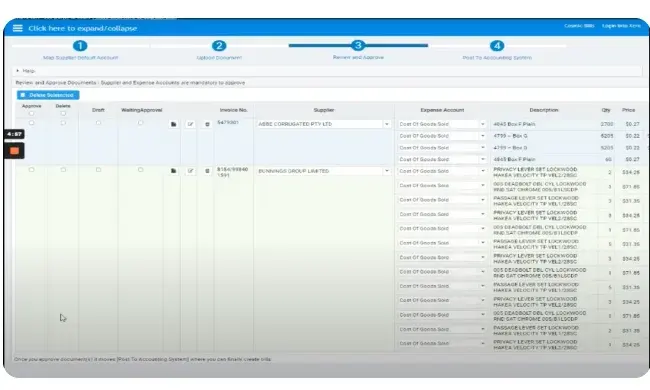
Cosmic Bills pulls the line items out of the PDF, matches them to your accounts, and holds the bill in a queue. You review it once and it posts.
- Step 1
Send the bill
Forward the supplier email or drop the PDF in. It does not need a filename or a folder.
- Step 2
Check the lines
Quantities, unit prices and GST arrive filled in. Change anything that looks wrong and it remembers.
- Step 3
Approve once
One click posts the bill to Xero with the account codes already set and the supplier matched.
- Step 4
Keep the paper
Every PDF stays attached to its bill for seven years, in Xero and here, ready for an audit.
Reviews
What our clients think of us
We had two people keying invoices every Monday. Now one person checks a queue for twenty minutes and the morning is back.

Priya Raman
Finance manager at Harbourline Freight
It caught a duplicate from a supplier who sends the same PDF twice a quarter. That one catch paid for the year.

Tom Ferreira
Bookkeeper at Vellum & Co
Setup took a morning. By the second week the account mapping was right often enough that I stopped checking every line.

Alice Nguyen
Practice owner at Northgate Advisory
Approvals used to sit in someone's inbox. Now they sit in one list and anyone can see what is waiting.

Dermot Whelan
Operations lead at Basalt Studio
GST on freight lines was our recurring error. It has not happened once since we moved the bills across in March.

Sanne de Vries
Financial controller at Pinecrest Group
I stopped dreading the last week of the month. That is the whole review, really.

Kwame Boateng
Office manager at Tallow Bay
Unique selling points
Why teams pick Cosmic Bills.
Time back
11 hrs
Saved on a 200-bill month, averaged across 40 teams
Left alone
99.2%
Of line items posted last quarter without an edit
Setup
1 day
From connecting Xero to bills posting on their own
Last 100 bills
The team
Built by people who did the books
Four people in Sydney. Two of us keyed invoices for a living, which is why the queue looks the way it does.

Daniel Hsu
Founder
Ran accounts payable at a freight company for nine years, mostly on a Monday.

Wei Zhang
Engineering
Wrote the line-item parser. It reads about 300 invoice layouts and learns new ones.

Jun Park
Support
Answers every setup email himself, usually inside the hour.
One seat open
We are looking for a bookkeeper who wants to spend a year teaching software to read a tax invoice.
Talk to us
Ready to stop typing bills?
Send us ten invoices from your last run. We will show you what comes back in Xero, and you can keep the result either way.
Book a walkthrough
Frequently asked questions
- Any plan that includes bills. Everything happens on the bills side of your ledger.
- About an hour. You authorise Xero, forward one bill, and check the account it picked. Most teams are running the next morning.
- It waits in a held queue with the PDF open beside it and you key that one by hand. Nothing posts to Xero without a person approving it.
- Yes. Every file stays attached to its bill for seven years, both in Xero and here, so an audit never sends you back to an inbox.
- Yes. You can require a second approval above an amount you set, and the queue shows who is holding what.
- Free for the first 30 days, then a price per bill. You pay for bills rather than for seats, and there is nothing to cancel.

Start with your next bill run
Connect Xero, forward a bill, and see it come back coded. Nothing posts until you approve it.